How would you implement a custom exception handling framework in Apex?
By GetItFully••70 min read
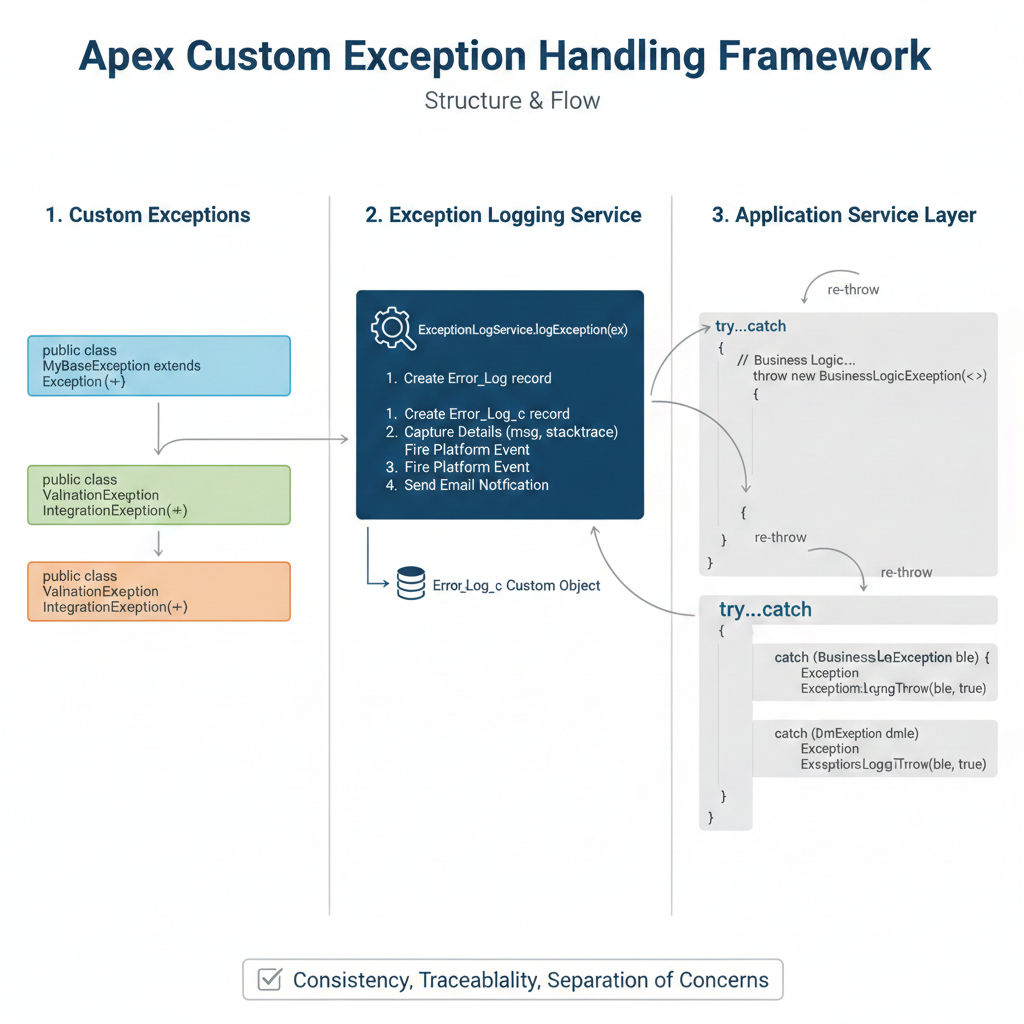
Custom Exception Handling Framework in Apex
A well-designed Custom exception framework provides consistent error management, better debugging, and cleaner code. Here's a comprehensive approach:
Understanding the Custom Exception Framework
1. Custom Exception Hierarchy
apex
public virtual class AppException extends Exception {
    public String errorCode { get; private set; }
    public String severity { get; private set; }
    public Object context { get; private set; }

    public AppException(String message, String errorCode, String severity) {
        this(message);
        this.errorCode = errorCode;
        this.severity = severity;
    }

    public AppException setContext(Object ctx) {
        this.context = ctx;
        return this;
    }
}

// Specific exception types
public class ValidationException extends AppException {
    public List<String> fieldErrors { get; private set; }

    public ValidationException(String message, List<String> fieldErrors) {
        super(message, 'VALIDATION_ERROR', 'WARNING');
        this.fieldErrors = fieldErrors;
    }
}

public class IntegrationException extends AppException {
    public Integer statusCode { get; private set; }
    public String endpoint { get; private set; }

    public IntegrationException(String message, Integer statusCode, String endpoint) {
        super(message, 'INTEGRATION_ERROR', 'ERROR');
        this.statusCode = statusCode;
        this.endpoint = endpoint;
    }
}

public class DataAccessException extends AppException {
    public DataAccessException(String message) {
        super(message, 'DATA_ACCESS_ERROR', 'ERROR');
    }
}2. Exception Logger Service
apex
public class ExceptionLogger {

    private static List<Error_Log__c> pendingLogs = new List<Error_Log__c>();

    public static void log(Exception ex) {
        log(ex, null, null);
    }

    public static void log(Exception ex, String className, String methodName) {
        Error_Log__c errorLog = new Error_Log__c(
            Error_Message__c = ex.getMessage()?.abbreviate(32000),
            Stack_Trace__c = ex.getStackTraceString()?.abbreviate(32000),
            Exception_Type__c = ex.getTypeName(),
            Class_Name__c = className,
            Method_Name__c = methodName,
            User__c = UserInfo.getUserId(),
            Timestamp__c = Datetime.now()
        );

        // Add custom exception details
        if (ex instanceof AppException) {
            AppException appEx = (AppException) ex;
            errorLog.Error_Code__c = appEx.errorCode;
            errorLog.Severity__c = appEx.severity;
            errorLog.Context__c = JSON.serialize(appEx.context)?.abbreviate(32000);
        }

        pendingLogs.add(errorLog);
    }

    public static void commitLogs() {
        if (!pendingLogs.isEmpty()) {
            // Use without sharing to ensure logs are saved
            Database.insert(pendingLogs, false);
            pendingLogs.clear();
        }
    }

    // For async operations - use Platform Events for reliable logging
    public static void publishError(Exception ex, String source) {
        Error_Event__e event = new Error_Event__e(
            Message__c = ex.getMessage()?.abbreviate(32000),
            Stack_Trace__c = ex.getStackTraceString()?.abbreviate(32000),
            Source__c = source,
            User_Id__c = UserInfo.getUserId()
        );
        EventBus.publish(event);
    }
}3. Result Wrapper Pattern
apex
public class Result {
    public Boolean isSuccess { get; private set; }
    public Object data { get; private set; }
    public List<String> errors { get; private set; }
    public String errorCode { get; private set; }

    private Result() {
        this.errors = new List<String>();
    }

    public static Result success(Object data) {
        Result r = new Result();
        r.isSuccess = true;
        r.data = data;
        return r;
    }

    public static Result failure(String error) {
        Result r = new Result();
        r.isSuccess = false;
        r.errors.add(error);
        return r;
    }

    public static Result failure(List<String> errors, String errorCode) {
        Result r = new Result();
        r.isSuccess = false;
        r.errors = errors;
        r.errorCode = errorCode;
        return r;
    }

    public static Result fromException(Exception ex) {
        Result r = new Result();
        r.isSuccess = false;
        r.errors.add(ex.getMessage());
        if (ex instanceof AppException) {
            r.errorCode = ((AppException) ex).errorCode;
        }
        return r;
    }
}4. Service Layer Implementation
apex
public class AccountService {

    public Result createAccount(Account acc) {
        Savepoint sp = Database.setSavepoint();

        try {
            // Validation
            List<String> validationErrors = validateAccount(acc);
            if (!validationErrors.isEmpty()) {
                throw new ValidationException('Validation failed', validationErrors);
            }

            insert acc;
            return Result.success(acc.Id);

        } catch (ValidationException ex) {
            Database.rollback(sp);
            ExceptionLogger.log(ex, 'AccountService', 'createAccount');
            return Result.fromException(ex);

        } catch (DmlException ex) {
            Database.rollback(sp);
            ExceptionLogger.log(ex, 'AccountService', 'createAccount');
            return Result.failure('Failed to save account: ' + ex.getDmlMessage(0));

        } catch (Exception ex) {
            Database.rollback(sp);
            ExceptionLogger.log(ex, 'AccountService', 'createAccount');
            return Result.failure('An unexpected error occurred');

        } finally {
            ExceptionLogger.commitLogs();
        }
    }

    private List<String> validateAccount(Account acc) {
        List<String> errors = new List<String>();
        if (String.isBlank(acc.Name)) {
            errors.add('Account Name is required');
        }
        return errors;
    }
}5. Integration Exception Handler
Particularly useful for your SAP/XENLINK integrations:
apex
public class IntegrationExceptionHandler {

    public static Result handleCallout(HttpResponse response, String endpoint) {
        Integer statusCode = response.getStatusCode();

        if (statusCode >= 200 && statusCode < 300) {
            return Result.success(response.getBody());
        }

        IntegrationException ex = new IntegrationException(
            'API call failed: ' + response.getStatus(),
            statusCode,
            endpoint
        );
        ex.setContext(new Map<String, Object>{
            'responseBody' => response.getBody()?.abbreviate(5000),
            'headers' => response.getHeader('Content-Type')
        });

        ExceptionLogger.log(ex, 'IntegrationExceptionHandler', 'handleCallout');
        ExceptionLogger.commitLogs();

        // Return user-friendly message based on status
        String userMessage = getUserFriendlyMessage(statusCode);
        return Result.failure(userMessage, 'INTEGRATION_ERROR');
    }

    private static String getUserFriendlyMessage(Integer statusCode) {
        Map<Integer, String> messages = new Map<Integer, String>{
            400 => 'Invalid request data',
            401 => 'Authentication failed',
            403 => 'Access denied',
            404 => 'Resource not found',
            500 => 'External system error',
            503 => 'Service temporarily unavailable'
        };
        return messages.containsKey(statusCode)
            ? messages.get(statusCode)
            : 'Integration error occurred';
    }
}6. LWC-Friendly Error Response
apex
public class AuraResponse {
    @AuraEnabled public Boolean success;
    @AuraEnabled public Object data;
    @AuraEnabled public String errorMessage;
    @AuraEnabled public String errorCode;
    @AuraEnabled public List<String> fieldErrors;

    public static AuraResponse fromResult(Result r) {
        AuraResponse resp = new AuraResponse();
        resp.success = r.isSuccess;
        resp.data = r.data;
        resp.errorMessage = r.errors.isEmpty() ? null : r.errors[0];
        resp.errorCode = r.errorCode;
        resp.fieldErrors = r.errors;
        return resp;
    }
}

// Controller usage
@AuraEnabled
public static AuraResponse createAccountAction(Account acc) {
    AccountService service = new AccountService();
    Result result = service.createAccount(acc);
    return AuraResponse.fromResult(result);
}Key Benefits
| Aspect | Benefit |
|---|---|
| Consistency | All errors follow the same structure |
| Debuggability | Rich context captured in logs |
| Separation | Business logic stays clean |
| Flexibility | Easy to extend for new exception types |
| Integration-ready | Works well with external system errors |
This framework gives you centralized logging, typed exceptions for different scenarios, and clean separation between technical errors and user-facing messages—essential for complex integration projects.
Related Posts





