How to Perform dynamic SOQL based on user input
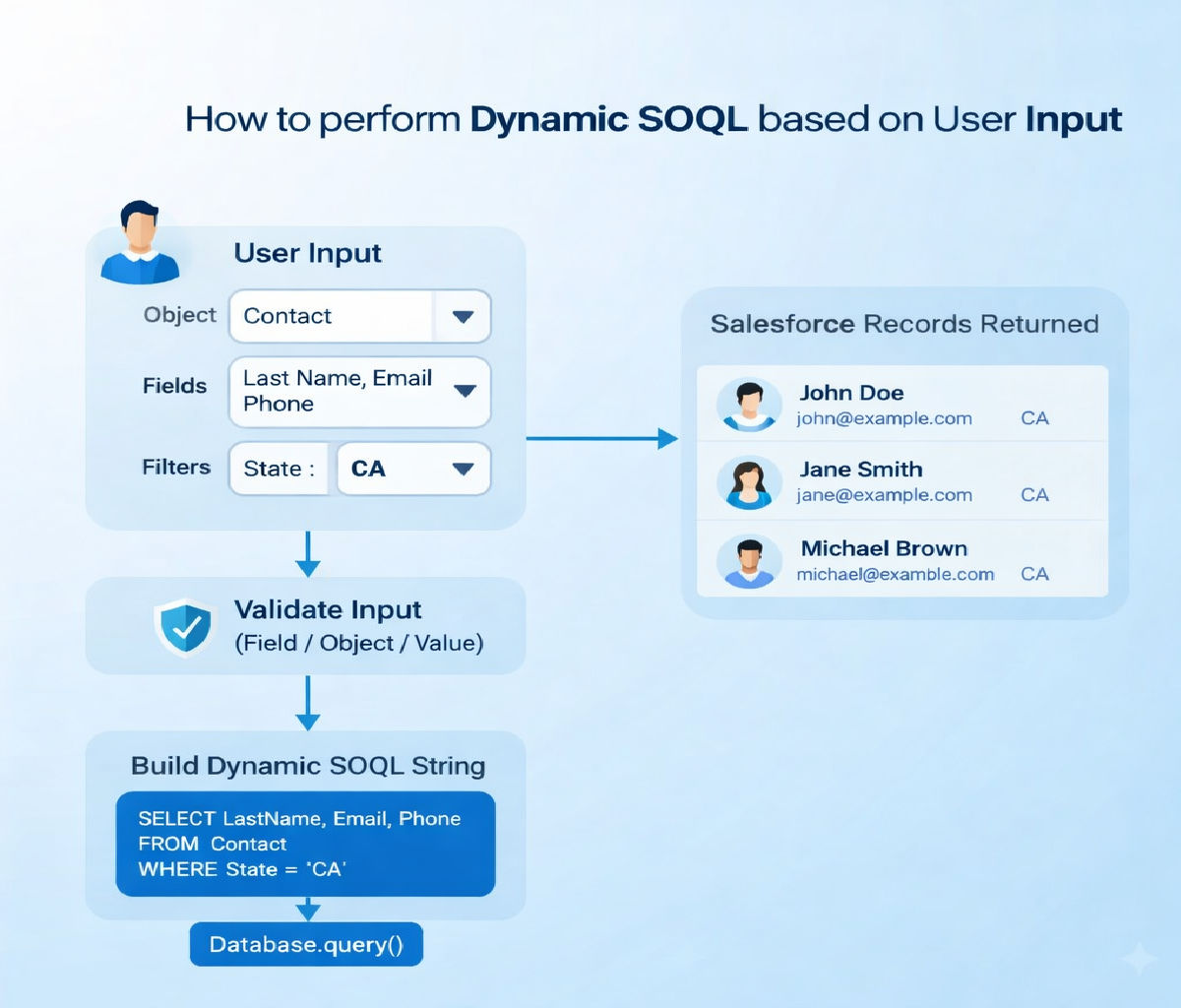
Dynamic SOQL is a powerful feature in Salesforce Apex that allows developers to construct SOQL queries at runtime based on user input or changing conditions. It is commonly used in search screens, filters, reports, admin tools, and configurable applications where query conditions cannot be fully determined at compile time.
This guide explains how to perform dynamic SOQL based on user input, covering syntax, real-world use cases, security considerations, performance best practices, and complete Apex code examples. The article is written for beginners to advanced developers and follows Salesforce-recommended patterns.
1. What Is Dynamic SOQL?
In Salesforce, there are two ways to write SOQL queries:
- Static SOQL – written directly in Apex and evaluated at compile time
- Dynamic SOQL – constructed as a string and executed at runtime
Static SOQL Example
List<Account> accs = [SELECT Id, Name FROM Account WHERE Industry = 'IT'];Dynamic SOQL Example
String industry = 'IT';

String query = 'SELECT Id, Name FROM Account WHERE Industry = :industry';

List<Account> accs = Database.query(query);Dynamic SOQL is useful when filters, fields, or objects depend on user input or configuration.
2. Common Business Scenarios
Dynamic SOQL is commonly used in the following scenarios:
- Search pages with multiple optional filters
- Lightning components with dynamic field selection
- Admin tools that work across objects
- Configurable reports driven by Custom Metadata
- Advanced list views and dashboards
Example Scenario
A user selects Object, Field, Operator, and Value from a UI, and the system builds a SOQL query dynamically to fetch records.
3. Understanding User Input Types
User input can arrive from:
- Lightning Web Components (LWC)
- Aura Components
- Visualforce pages
- Flow inputs
- REST API requests
Typical input values include:
- Field names
- Filter values
- Sorting preferences
- Limit size
- Date ranges
All user input must be handled carefully to avoid SOQL injection.
4. Basic Dynamic SOQL Structure
The core steps are:
- Capture user input
- Validate input
- Build query string
- Bind variables where possible
- Execute using
Database.query()
Basic Pattern
String baseQuery = 'SELECT Id, Name FROM Account';

String whereClause = ' WHERE Industry = :industry';

String finalQuery = baseQuery + whereClause;

List<Account> results = Database.query(finalQuery);5. Dynamic WHERE Clause Based on User Input
Often, users may provide optional filters. In such cases, build the WHERE clause conditionally.
Example: Search Accounts by Name and Industry
public static List<Account> searchAccounts(String name, String industry) {

String query = 'SELECT Id, Name, Industry FROM Account';

List<String> conditions = new List<String>();

if (String.isNotBlank(name)) {

conditions.add('Name LIKE :(\'%' + name + '%\')');

}

if (String.isNotBlank(industry)) {

conditions.add('Industry = :industry');

}

if (!conditions.isEmpty()) {

query += ' WHERE ' + String.join(conditions, ' AND ');

}

return Database.query(query);

}This approach ensures flexibility while keeping the query readable.
6. Using Bind Variables Safely
Why Bind Variables Matter
Bind variables:
- Prevent SOQL injection
- Improve performance
- Handle data types correctly
Correct Usage
String nameFilter = 'Acme';

String query = 'SELECT Id FROM Account WHERE Name = :nameFilter';

List<Account> accs = Database.query(query);What NOT to Do
String query = 'SELECT Id FROM Account WHERE Name = \'' + name + '\'';Never directly concatenate untrusted user input.
7. Dynamic Field Selection
Sometimes users choose which fields to display.
Example: User-Selected Fields
public static List<SObject> fetchRecords(String objectName, List<String> fields) {

String fieldList = String.join(fields, ',');

String query = 'SELECT ' + fieldList + ' FROM ' + objectName + ' LIMIT 50';

return Database.query(query);

}Validation Required
Always validate:
- Object names
- Field names
Using Schema.describe is mandatory for security.
8. Validating Object and Field Names
Object Validation
Schema.SObjectType objType = Schema.getGlobalDescribe().get(objectName);

if (objType == null) {

throw new AuraHandledException('Invalid object');

}Field Validation
Map<String, Schema.SObjectField> fieldMap = objType.getDescribe().fields.getMap();

for (String fieldName : fields) {

if (!fieldMap.containsKey(fieldName)) {

throw new AuraHandledException('Invalid field: ' + fieldName);

}

}This prevents malicious or incorrect queries.
9. Dynamic ORDER BY and LIMIT
Users may want sorting and pagination.
String orderBy = 'CreatedDate DESC';

Integer limitSize = 20;

String query = 'SELECT Id, Name FROM Account ORDER BY ' + orderBy + ' LIMIT :limitSize';

List<Account> accs = Database.query(query);Validate sorting fields before use.
10. Handling Date and Number Filters
Date Range Example
Date startDate = Date.today().addDays(-30);

Date endDate = Date.today();

String query = 'SELECT Id FROM Opportunity WHERE CloseDate >= :startDate AND CloseDate <= :endDate';Number Filter Example
Decimal minAmount = 50000;

String query = 'SELECT Id FROM Opportunity WHERE Amount >= :minAmount';Bind variables automatically handle data types.
11. Dynamic SOQL with IN Clause
List<String> industries = new List<String>{'IT','Finance'};

String query = 'SELECT Id FROM Account WHERE Industry IN :industries';

List<Account> accs = Database.query(query);This is common for multi-select filters.
12. Governor Limits and Performance
Dynamic SOQL follows the same governor limits as static SOQL:
- 100 SOQL queries per transaction
- 50,000 rows per query
Best Practices
- Query only required fields
- Use selective filters
- Avoid queries in loops
- Use LIMIT for UI queries
13. Dynamic SOQL vs SOSL
| Feature | Dynamic SOQL | SOSL |
|---|---|---|
| Structured filters | Yes | No |
| Cross-object search | Limited | Yes |
| User-driven fields | Yes | Limited |
Use SOSL when searching text across multiple objects.
14. Test Class for Dynamic SOQL
@isTest

public class DynamicSOQLTest {

@isTest

static void testDynamicQuery() {

Account acc = new Account(Name = 'Dynamic Test', Industry = 'IT');

insert acc;

List<Account> results = DynamicQueryService.searchAccounts('Dynamic', 'IT');

System.assertEquals(1, results.size());

}

}Tests ensure logic remains stable after changes.
15. Common Mistakes to Avoid
- Direct string concatenation with user input
- Not validating field or object names
- Querying unnecessary fields
- Ignoring CRUD and FLS
- Building overly complex queries
16. Security Considerations
Always consider:
- SOQL injection
- Field-Level Security (FLS)
- Object-level permissions
Use:
Security.stripInaccessible(AccessType.READABLE, records);17. Best Practices Summary
- Prefer static SOQL when possible
- Use dynamic SOQL only when necessary
- Always use bind variables
- Validate schema elements
- Keep queries simple and selective
- Write comprehensive test classes
18. Conclusion
Dynamic SOQL enables highly flexible and configurable Salesforce applications. When built correctly, it allows developers to respond to user-driven requirements without sacrificing performance or security.
By validating user input, using bind variables, following governor limits, and writing clean Apex code, you can safely implement dynamic SOQL that scales across enterprise-level Salesforce orgs.
Mastering dynamic SOQL is an essential skill for advanced Apex developers and is frequently tested in real-world projects and Salesforce interviews.
Related Posts





